Top 10 Fanless PCs for Industrial Applications?
Industrial computers rarely work in a quiet, clean office. They may sit inside a dusty control cabinet, beside a conveyor, or near vibrating machinery. In these settings, a cooling fan can become a maintenance point. A Fanless Pc removes that moving part, but it does not remove every design challenge. Heat still needs a path out. Workloads still need suitable processing power, memory, and storage. Dust matters. Heat does too.
This guide compares ten fanless PCs designed for industrial applications, with attention to practical details rather than headline specifications alone. It considers processor options, available ports, mounting methods, operating temperature ranges, storage, and enclosure design. These factors help determine whether a system can connect to sensors, cameras, displays, and other equipment on a production floor. A compact box may fit neatly on a DIN rail, yet still lack the ports or thermal capacity a specific installation requires. Small details can matter.
No single model suits every site. A unit built for light monitoring may struggle with continuous vision processing, while a more powerful system can bring higher costs and greater heat output. Product specifications also vary by configuration, so buyers should confirm the exact model and intended operating conditions with the manufacturer. This comparison offers a practical starting point, not a substitute for checking site requirements. The best choice is the one that fits the real workload, environment, and maintenance plan. That sounds obvious, but it is easy to overlook.
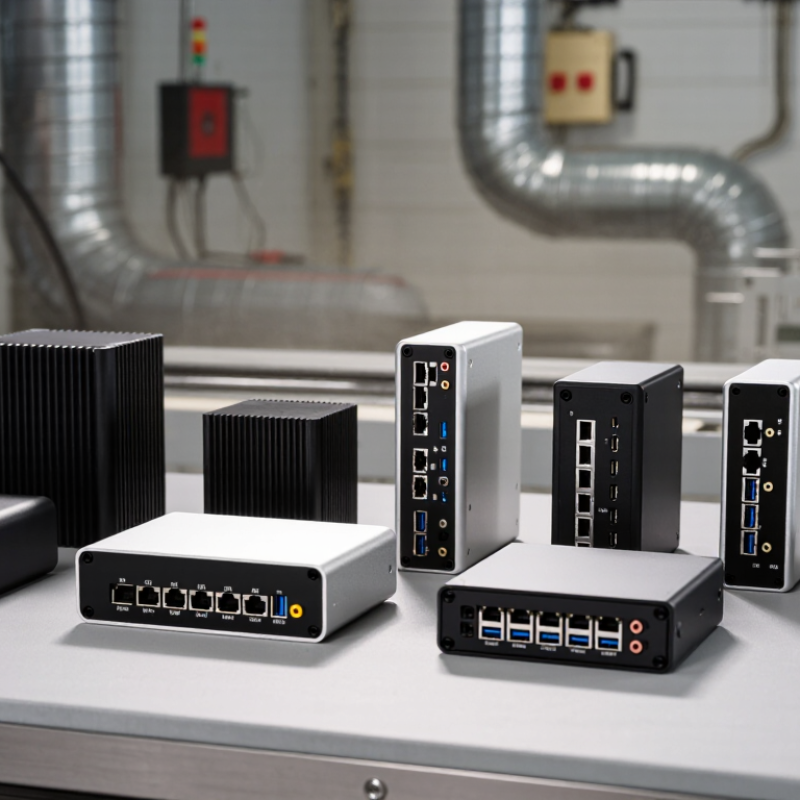
What Defines a Fanless PC for Industrial Applications
A fanless PC for industrial applications is defined by how it moves heat and withstands its surroundings, not simply by the absence of a fan. It usually transfers heat through a metal chassis or passive heatsink, reducing moving parts that can fail or draw dust inside. But a sealed case can trap heat. Heat has nowhere to hide. Engineers must match processor load, ambient temperature, and enclosure design.
The need for local computing is growing. IDC’s Worldwide Edge Spending Guide estimated global edge spending would reach $232 billion in 2024, up 15.4% year over year. Deloitte’s 2024 Smart Manufacturing Survey found that 92% of surveyed manufacturing executives saw smart manufacturing as a driver of competitiveness. These figures do not prove every site needs a fanless PC; they do show why reliable processing near machines matters. Check operating-temperature ratings, vibration resistance, ingress protection, and ports for sensors or field equipment. An IP rating alone does not guarantee resistance to every factory hazard.
Tips: Test the computer in its intended cabinet, under realistic workloads. A unit that stays cool on a desk may throttle beside a hot motor drive. Leave room for airflow around its fins, and verify how storage and memory respond to vibration. Fanless does not mean maintenance-free.
Key Features and Environmental Requirements
Industrial Fanless Pcs need more than a fan-free design. Their cases must move heat from processors and storage into surrounding air, even inside a crowded control cabinet. IDC’s 2024 Worldwide Edge Spending Guide forecast global edge-computing spending at $232 billion in 2024, up 15.4% from 2023. More edge installations mean more equipment operating near machines, dust, and heat. But spending forecasts do not tell engineers which enclosure will survive a specific site. Fanless is not maintenance-free.
Environmental limits should match measured conditions, not a catalogue’s best-case claim. ASHRAE’s 2021 Thermal Guidelines recommend 18–27°C inlet air for covered data-center equipment; this is a useful benchmark, not an industrial-PC guarantee. Record cabinet temperatures during peak production, and check the computer’s rated operating range. Heat still matters. Review IEC 60529 IP ratings against the actual risks of dust or water, and check shock and vibration specifications for nearby motors. Confirm thermal performance in the intended mounting position, with cables connected and airflow partly obstructed. Dust finds gaps. One overlooked detail: a sealed enclosure can trap its own heat, so a higher IP rating alone may make cooling harder.
How to Choose a Fanless PC for Your Industrial Setup
Top 10 Fanless PCs for Industrial Applications?
How to Choose a Fanless PC for Your Industrial Setup
Start with the environment, not the processor. A control cabinet beside a furnace needs different thermal capacity from a clean packaging station. Check the expected ambient temperature, available airflow, dust, moisture, and vibration. Heat matters. A fanless chassis sheds heat through its surface, so a powerful processor can throttle when enclosed tightly. Leave room around the case and verify its operating limits against real cabinet conditions.
Next, map the computer’s connections to the equipment it must control. Count Ethernet ports, serial interfaces, USB connections, display outputs, and digital inputs or outputs. Confirm voltage range and mounting options, too. A DIN-rail installation can save space, but nearby drives may introduce electrical noise. Look for suitable isolation and grounding guidance. Dust gets everywhere. An ingress-protection rating helps, but connectors and cable glands also need attention.
Match memory and storage to the application, then test the complete setup under sustained load. A brief bench test may miss thermal throttling after hours inside a warm enclosure. Monitor temperatures, processor speed, and storage health. Consider service access, replacement availability, and operating-system support over the equipment’s expected life. I would avoid choosing solely by headline specifications; a modest system with stable temperatures may outperform a faster unit that overheats. This trade-off is easy to underestimate.
